Exploring Segment Anything Model 2 (SAM 2) with Gradio
Introduction
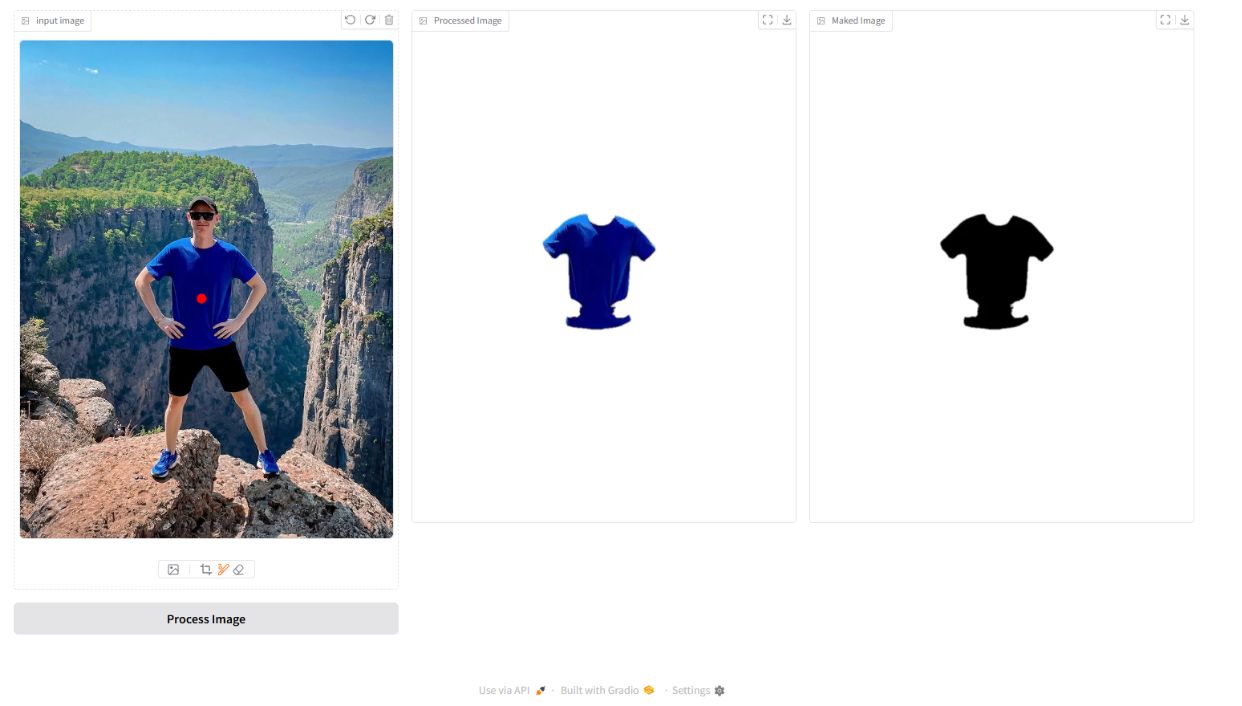
I recently explored the Segment Anything Model 2 (SAM 2) developed by Meta, and I am highly impressed by its remarkable capabilities. This advanced model facilitates image segmentation by taking a NumPy array representation of an image and corresponding point coordinates as input. However, obtaining these coordinates from users can be a challenge.
To streamline this process, I integrated Gradio — an intuitive interface for deploying machine learning models — making it accessible for end users without requiring them to understand the underlying coordinate system.
What is SAM 2?
SAM 2 is Meta's second-generation Segment Anything Model. Unlike its predecessor, SAM 2 adds video segmentation capabilities while maintaining strong zero-shot performance on images. The key features:
- Zero-shot segmentation: Segment any object without task-specific training
- Point, box, and mask prompts: Multiple ways to specify what to segment
- Hierarchical image encoding: Efficient multi-scale feature extraction
- Streaming memory: For video, it remembers object state across frames
For this project, I focused on image segmentation using point prompts.
Extracting Coordinates from Images
One of the key challenges was efficiently extracting the desired coordinates. Instead of requiring users to manually input pixel coordinates, I leveraged image layers stored in a NumPy array and applied filters to identify clusters that resemble red dots. This technique allows precise coordinate point extraction from a user-drawn annotation.
import numpy as np

def extract_red_dot_coords(image: np.ndarray) -> list[tuple[int, int]]:
    """Extract (x, y) coords of red dot clusters from an RGBA image."""
    r, g, b, a = image[:,:,0], image[:,:,1], image[:,:,2], image[:,:,3]

    red_mask = (r > 150) & (g < 80) & (b < 80) & (a > 200)

    ys, xs = np.where(red_mask)
    if len(xs) == 0:
        return []

    # Return centroid of the cluster
    return [(int(xs.mean()), int(ys.mean()))]
Setting Up SAM 2
import torch
from sam2.build_sam import build_sam2
from sam2.sam2_image_predictor import SAM2ImagePredictor

checkpoint = "checkpoints/sam2_hiera_large.pt"
model_cfg = "sam2_hiera_l.yaml"

sam2_model = build_sam2(model_cfg, checkpoint)
predictor = SAM2ImagePredictor(sam2_model)
Running Segmentation
def segment(image_rgb: np.ndarray, point_coords: list[tuple[int, int]]) -> np.ndarray:
    predictor.set_image(image_rgb)

    coords = np.array(point_coords, dtype=np.float32)
    labels = np.ones(len(coords), dtype=np.int32)  # 1 = foreground

    masks, scores, _ = predictor.predict(
        point_coords=coords,
        point_labels=labels,
        multimask_output=True
    )

    # Pick highest-confidence mask
    best_mask = masks[scores.argmax()]
    return best_mask
Isolating Points Using the Output Mask
Once the coordinates were identified, I utilized the output mask generated by SAM 2 to isolate the specified points from the original image. This resulted in a masked version highlighting the selected regions:
def apply_mask(image: np.ndarray, mask: np.ndarray) -> np.ndarray:
    """Apply binary mask — background becomes transparent."""
    h, w = mask.shape
    result = np.zeros((h, w, 4), dtype=np.uint8)
    result[:, :, :3] = image[:, :, :3]
    result[:, :, 3] = mask.astype(np.uint8) * 255
    return result
Gradio Interface
import gradio as gr

def process(drawing, original):
    coords = extract_red_dot_coords(np.array(drawing["layers"][0]))
    if not coords:
        return original, "No point detected. Draw a red dot on the object."

    mask = segment(np.array(original), coords)
    result = apply_mask(np.array(original), mask)

    return result, f"Segmented at {coords[0]}"

with gr.Blocks() as demo:
    gr.Markdown("## SAM 2 Image Segmentation")
    with gr.Row():
        original = gr.Image(label="Original Image", type="pil")
        canvas   = gr.ImageEditor(label="Draw a red dot on target")

    btn = gr.Button("Segment")
    with gr.Row():
        output_img  = gr.Image(label="Segmented Output")
        output_text = gr.Textbox(label="Status")

    btn.click(process, inputs=[canvas, original], outputs=[output_img, output_text])

demo.launch()
Benefits of This Approach
- Automated Feature Extraction — No need for manual coordinate input; extraction is data-driven from user drawings.
- Efficient Image Segmentation — Leverages deep learning to achieve high precision with zero-shot capability.
- Seamless Deployment with Gradio — Provides an easy-to-use web interface for users to interact with the model.
- Flexible Application — Can be extended to various segmentation tasks, from medical imaging to object detection.
Conclusion
By integrating SAM 2 with Gradio and leveraging NumPy-based processing, I streamlined the process of extracting segmentation coordinates and generating precise masks. This approach showcases the potential of foundation models in real-world applications, making segmentation more efficient and user-friendly than ever before.
The combination of SAM 2's zero-shot capability and Gradio's rapid UI deployment is powerful — you can build a working segmentation tool in under 100 lines of code that handles arbitrary objects without any fine-tuning.